Overview
A system that connects many users at once to a single Jetstream2 virtual machine, keeps every session isolated from the others, and automatically shelves the VM when nobody is active — without ever giving individual users direct access to the Jetstream2 infrastructure.
Jetstream2's standard setup creates a real problem for academic environments. Giving a student remote desktop access normally requires an AccessCI account, but that account doesn't just grant desktop access — it also hands them the ability to create and delete virtual machines, effectively giving them administrative control over the whole project's infrastructure. On top of that, the default lab images only support one graphical session per VM at a time, so a 30-student lab would otherwise require 30 separate VMs (and 30 separate compute budgets) running in parallel, often left on overnight if a student forgets to log off.
This project solves all three problems with a custom desktop client and central management service: students log in with a simple username and password, never see any cloud credentials, and can share a single, more powerful VM through isolated, per-user desktop sessions that spin down automatically when idle.
How It Works
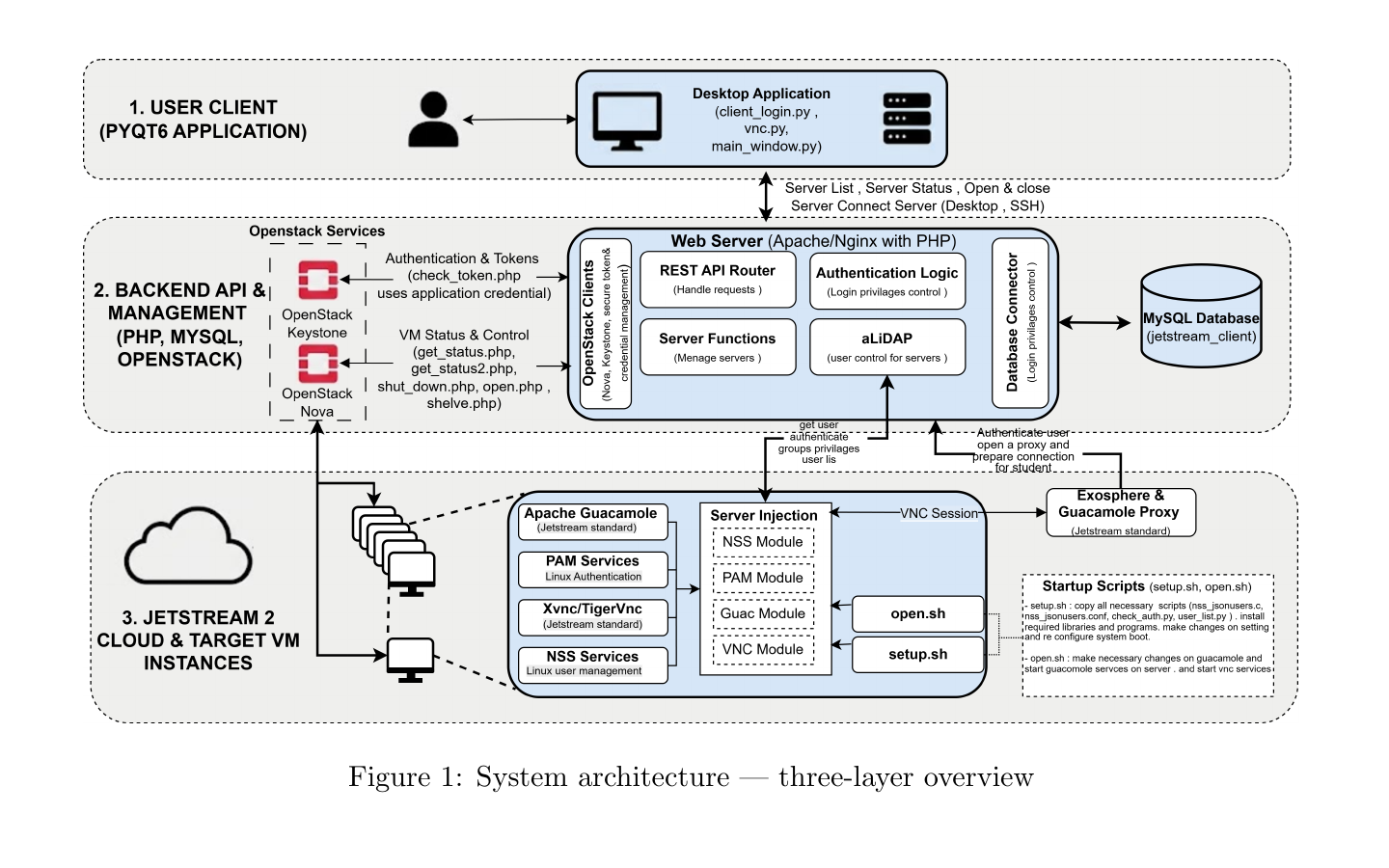
System architecture — three-layer overview
- Desktop Client: a lightweight application students use to log in and connect. It never touches Jetstream2 directly or holds any cloud credentials — it only talks to CRADLE Lab's own backend.
- Backend API & Management: the central service that authenticates users, tracks and controls virtual machines, and is the only part of the system that ever communicates with Jetstream2 directly.
- Jetstream2 VM Instances: shared virtual machines that support multiple simultaneous, isolated desktop sessions instead of just one, with unused sessions and idle machines cleaned up automatically.
What It Solves
| Problem | Solution |
|---|---|
| Every user needs their own Jetstream2 credentials | Central login system — users never see the underlying cloud infrastructure |
| Only one session per VM at a time | Isolated, per-user desktop sessions on a single shared VM |
| Idle VMs burn compute credits | Automatic shelving after inactivity, with a background safety check |
| Adding users requires touching each VM | Users and access are managed centrally, in one place |
Related Project
Back to Research & ProjectsQuick Facts
- Type: Project
- Status: Completed
- Lead: Ali Arslan
- Repository: GitHub